You hang up the call. You stare at your screen. What did they say their product launch date was again? Was it the 14th or the 18th? And weren't they unhappy about the pricing last time? You open a dozen Notion tabs, scroll through Slack threads, scan an email chain from three months ago. Nothing. So you go into the next meeting blind — and it shows.
This scene plays out dozens of times a day for anyone who talks to people for a living. Account managers. Founders. Consultants. Salespeople. Product managers. We're all swimming in conversations, and we're drowning in the cognitive overhead of remembering what happened in them.
The Memory Problem Nobody's Solved
Think about the gap between how much we say and how much we retain. Research consistently shows that people forget roughly 50% of information presented to them within an hour of hearing it. After a week, that number climbs above 90%. Yet our entire professional lives are built on top of conversations — and we're expected to remember all of them.
The existing "solutions" are a patchwork of pain. CRM tools require you to manually log notes after every meeting — an act that almost nobody does consistently, least of all when the next call is in 10 minutes. Meeting bots like Otter or Fireflies join your calls, announce themselves, make the other party uncomfortable, and still just give you a wall of text to read later. And none of them give you anything during the meeting, when you actually need it.
The real problem is this: your memory doesn't have context at the moment of need. You're on a call with a client right now, and somewhere in your head is the vague recollection that last quarter they were frustrated about onboarding. But you can't access it. It's buried. You're on your own.
That's the question we started with. And after a weekend of building, that's exactly what Recall does.
Meet Recall: Your Invisible Memory Layer
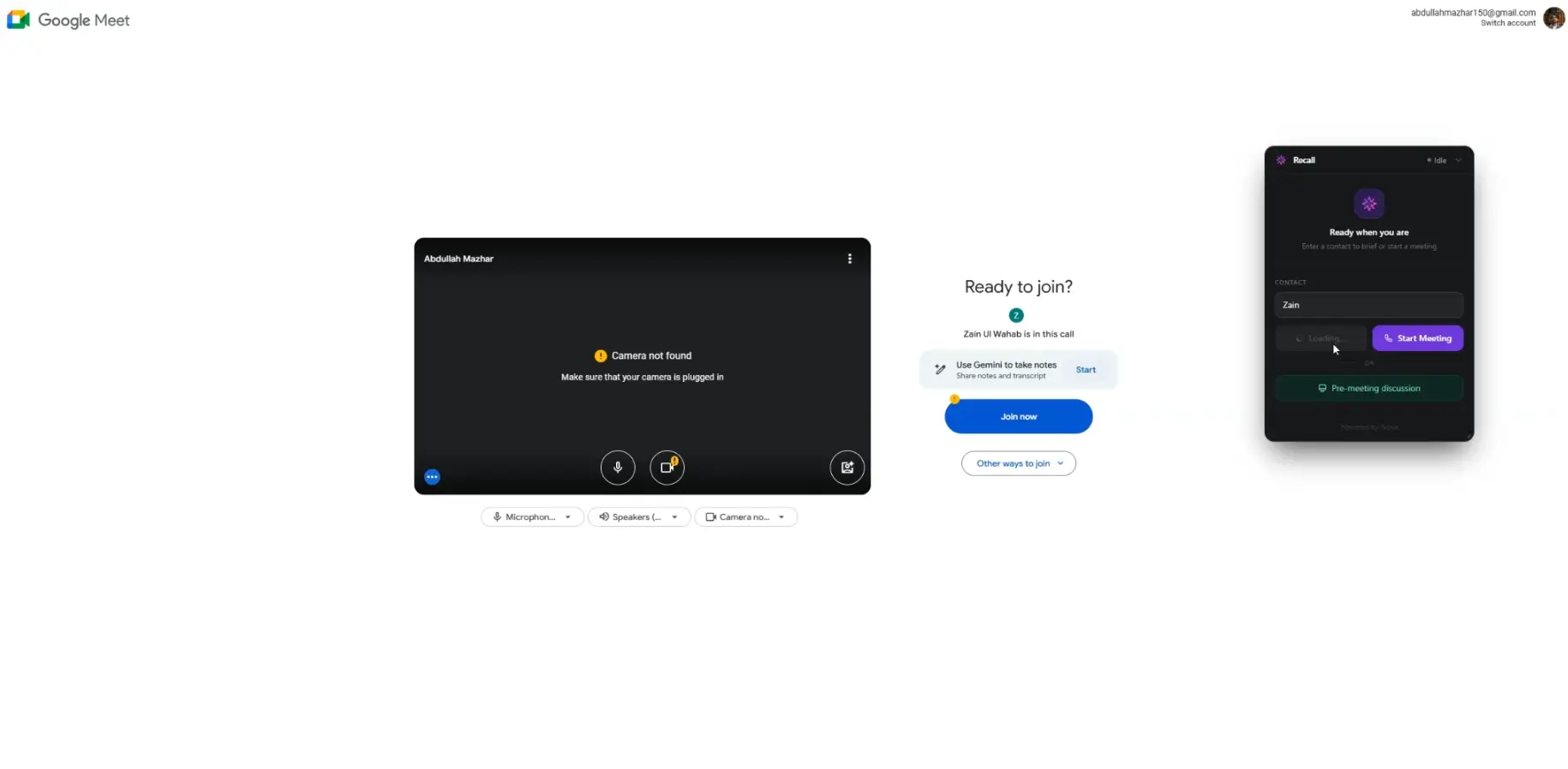
Recall is a floating desktop widget — small, unobtrusive, always there. It quietly listens to your conversations through your microphone and system audio. It doesn't join your meeting. It doesn't need an integration. It doesn't require you to do anything differently. You just have your conversation, and Recall builds a persistent, searchable memory graph in the background.
Here's what using it actually feels like:
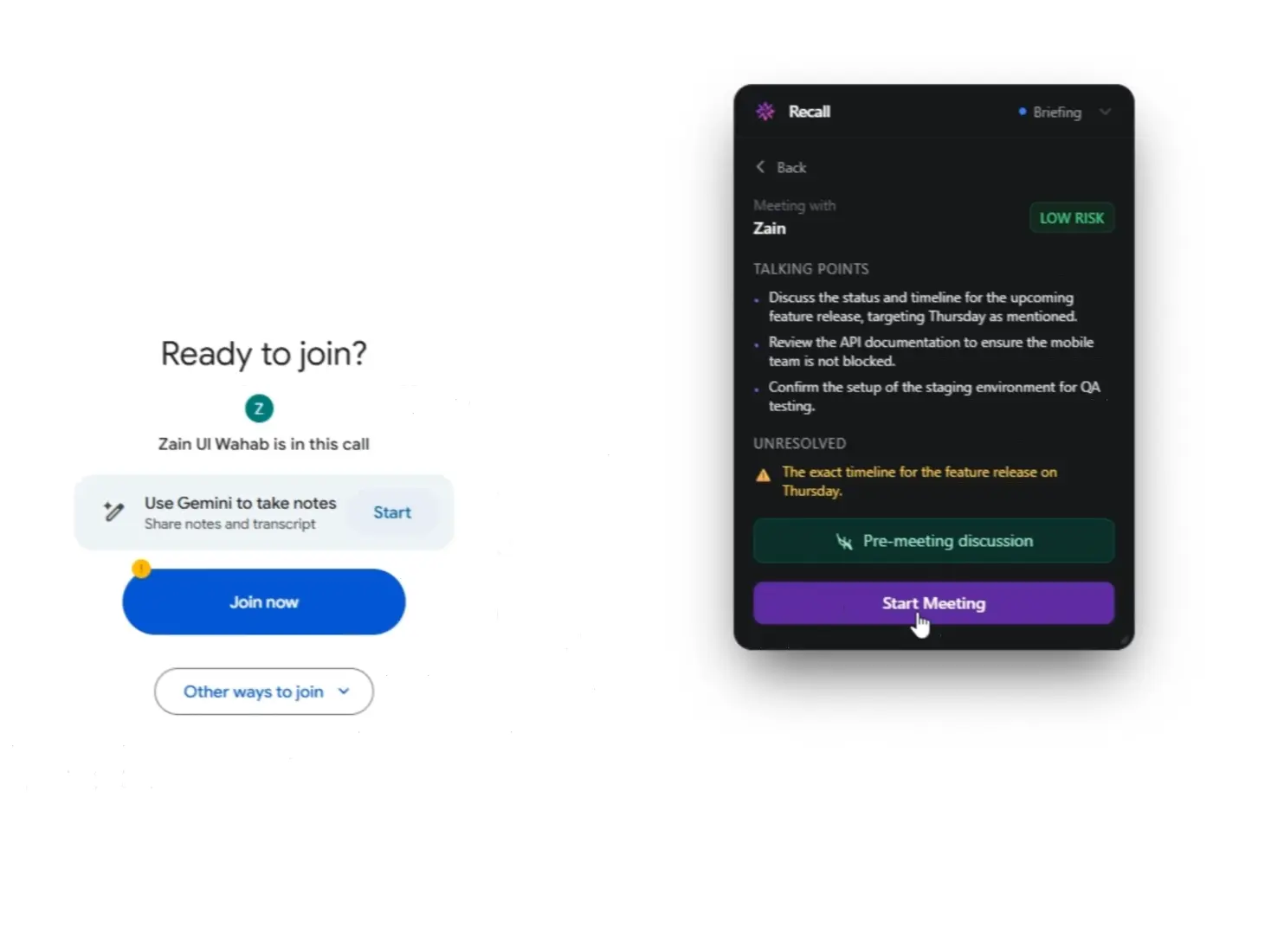
You're about to hop on a call with a client you last spoke to six weeks ago. Before you dial, you open Recall's pre-meeting brief. In under five seconds, it surfaces a crisp card: the two commitments made last time (neither of which were fully resolved), a note that they mentioned budget concerns, and a suggested talking point you'd missed. You feel prepared. Confident. Present.
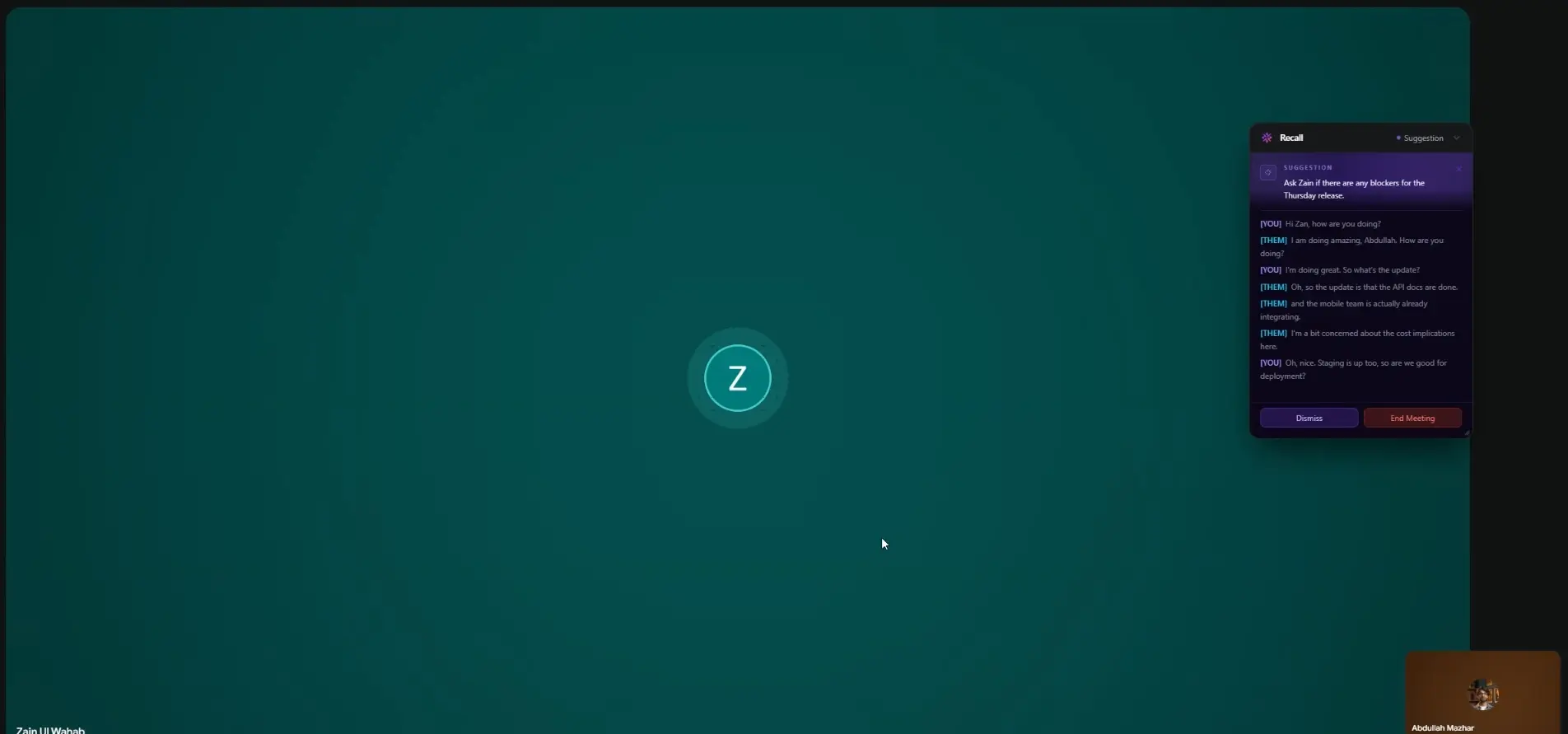
During the call, a small suggestion popup appears inside the Recall widget every few minutes — not intrusive, just a gentle nudge. "They mentioned Q4 launch — you committed to delivering specs by Nov 1st last time." You nod, make a note. The other person has no idea any of this is happening.
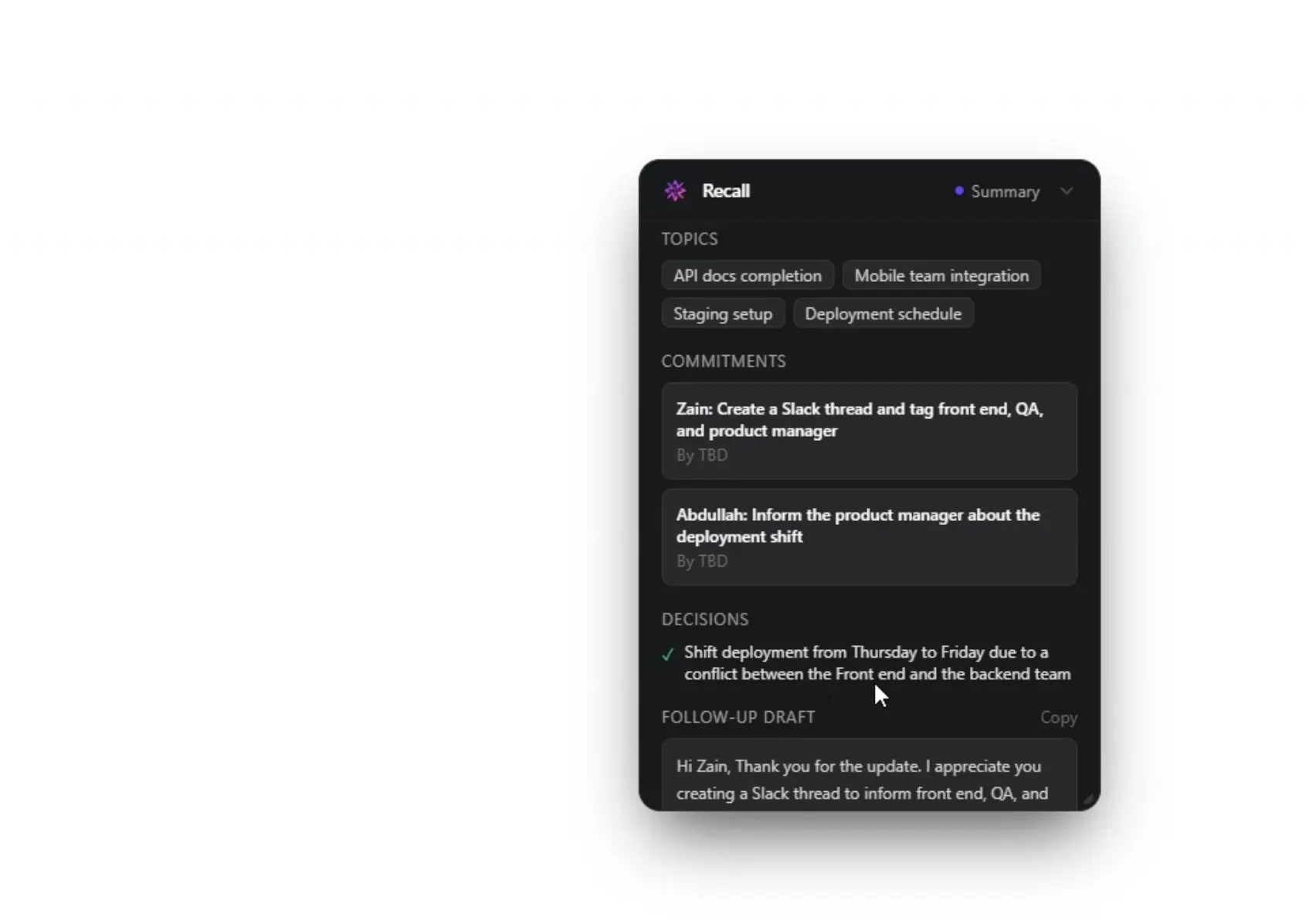
When the call ends, Recall has already drafted your follow-up email, flagged the three new commitments made, and done a tone analysis of the conversation. You spend 90 seconds reviewing it and hit send. That's it.
The key features that make this possible:
- Live Copilot — Contextual suggestion popups inside the widget every ~30 seconds, triggered by transcript analysis against your meeting history
- Pre-Meeting Briefs — Talking points, unresolved items, risk signals, things to avoid — synthesised from your last 5 meetings with that contact
- Post-Meeting Summaries — Decisions, commitments (who/what/by-when), tone analysis, and a draft follow-up email
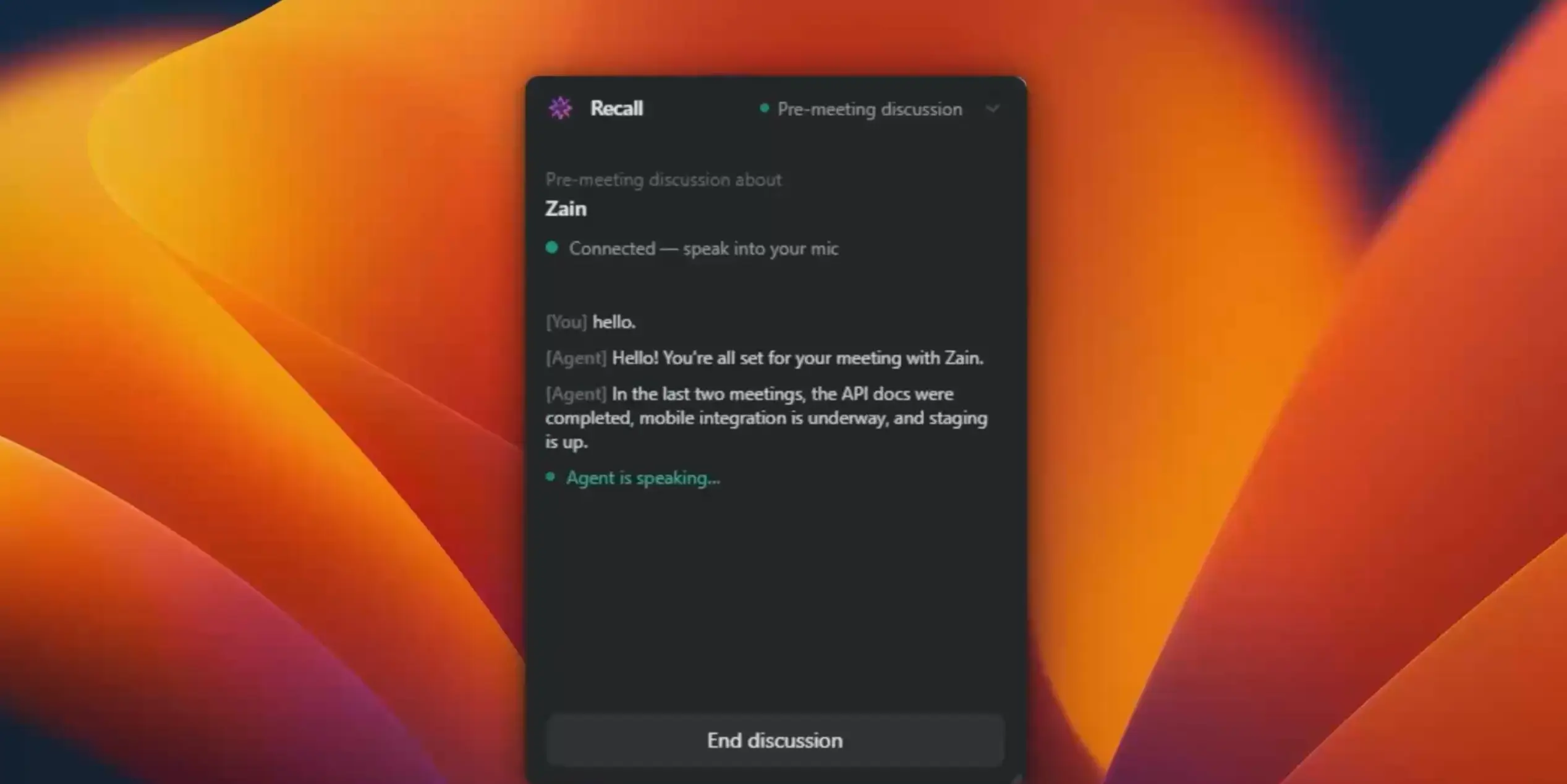
- Recall Agent — A voice-powered conversational AI you can brief with before a call, in real-time, to surface anything from your memory graph
Under the Hood: How Recall Actually Works
The deceptively simple user experience is hiding a fairly involved backend. Let us walk you through it — because the architecture is where things get interesting.
The frontend is an Electron app built with React + Vite. This matters because Electron gives us direct access to the system's audio layer — specifically, we capture two completely separate audio streams: your microphone (your voice) and your system audio (the other person). These two tracks are sent as separate WebRTC streams to our backend via a standard SDP offer to POST /stream, tagged with a contact name and user ID.
Why separate tracks? Because speaker diarization — knowing who said what — is dramatically more reliable when the model doesn't have to guess. Your voice is always Track A. Theirs is always Track B. Clean.
The backend — a Flask + Flask-SocketIO server — receives the audio, resamples it from 48 kHz to 16 kHz PCM, and pipes it into Amazon Transcribe Streaming with speaker diarization enabled. From there, three specialised agents run in parallel on the resulting transcript:
The Live Copilot runs on a sliding window — every ~30 seconds (as long as at least 20 new words have been spoken), it sends the rolling transcript alongside retrieved context from previous meetings with this contact to Nova Lite. The model returns a short, actionable suggestion, which appears as a popup inside the Recall widget via Socket.IO.
The Memory Builder runs on meeting end. It takes the full transcript and has Nova Lite extract structured data: decisions made, commitments (who/what/by-when), emotional tone, key topics, and a follow-up email draft. That entire object gets written to DynamoDB, scoped per user and per contact.
The Briefing Agent is on-demand — when you open a pre-meeting brief, it loads the last 5 meetings with that contact from DynamoDB and synthesises a concise briefing card via Nova Lite.
Why Amazon Nova Was the Only Choice That Made Sense
We want to be honest here: we didn't start the hackathon with a predetermined answer. We had an architecture in mind and a user experience to deliver, and then we went looking for the model that could actually make it work at the latency and cost levels that a real product would require.
The hard constraint was this: the Live Copilot had to feel like a background whisper, not a loading spinner. If a suggestion takes 8 seconds to arrive, the moment is gone. The conversation has moved on. It's useless. We needed inference that was fast enough to feel invisible.
Nova Lite processes our rolling transcript + context retrieval in under 1.5 seconds end-to-end. That's fast enough that users perceive the suggestion as appearing "just in time" rather than being delayed. Comparable models we tested were 3–5× slower at similar context lengths — which completely breaks the UX. The 1M token context window meant we could include full meeting histories without chunking or retrieval hacks.
The Recall Agent needed to feel like a real conversation — not a chatbot. Nova Sonic's bidirectional voice capability meant we could build a genuinely interactive voice session where the user speaks naturally and gets a real-time voice response back, with full context of their meeting history loaded as the system prompt. The naturalness of the voice output and the low-latency turn-taking made it feel like talking to a well-prepared colleague, not querying a search engine.
The 1 million token context window across Nova models also quietly solved a problem we hadn't fully anticipated: memory retrieval. Our original plan involved a complex vector search + chunking pipeline to retrieve relevant past meeting excerpts before each agent call. With a 1M window, we could simply include the last 5 full meeting transcripts in context — no retrieval layer, no chunking, no semantic search tuning. The model handled the relevance selection internally. That saved us days of engineering.
What Was Actually Hard (And What We Learned)
We'd be lying if we said this all clicked together on the first try. Here are the three walls we hit — and how we got through them.
Dual-track audio capture on Windows vs macOS. Capturing system audio (the other person's voice) separately from the microphone is not a solved problem cross-platform. On macOS, system audio loopback requires a virtual audio driver. On Windows, WASAPI loopback is available but fiddly. We spent longer than we'd like to admit here before landing on a Web Audio API approach that worked reliably across both, piping both streams as separate WebRTC tracks to the backend so Amazon Transcribe could diarize cleanly.
Making the Live Copilot feel helpful, not noisy. Early versions were too eager. They'd surface suggestions every 30 seconds regardless of how substantive the conversation was. We ended up adding a word-count gate (20+ new words before triggering) and a topic-shift detector. The suggestions only appear when something genuinely new has been said — and the result is a product that feels attentive rather than annoying.
Nova Sonic session management across the Recall Agent. Building a persistent, stateful voice conversation with Nova Sonic — where the model holds context across the full session without re-initialising — required careful management of the bidirectional stream. We had to design the session lifecycle thoughtfully: loading meeting context into the system prompt on session start, handling interruptions gracefully, and ensuring the voice output felt natural when the user jumped between topics mid-conversation.
Where Recall Goes From Here
This hackathon was proof that the core mechanic works. But the surface area of what Recall could become is genuinely exciting.
The most immediate priority is relationship intelligence across contacts — not just "what did I talk to this person about" but "what does this person care about, what's their communication style, and how has our relationship evolved over time." With enough meeting history, Recall should be able to tell you that your client is most receptive to direct asks on Tuesdays and avoids budget conversations when he hasn't had his coffee.
We're also exploring a team layer — shared memory graphs where account teams can collaboratively build a unified view of a client relationship, without any one person becoming the single point of failure for institutional knowledge.
Longer-term: we think Recall could become the memory layer that every enterprise communication tool is missing. Not by replacing Zoom or Salesforce — but by sitting underneath them and making the people using them sharper.
See It in Action
Words only go so far. Here's a full walkthrough of Recall — from the floating widget capturing a live call, to the Live Copilot suggestions surfacing mid-conversation, to the post-meeting summary landing the moment the call ends.
Try It. We Built This for You.
Recall was built by Abdullah Mazhar and Zain Ul Wahab — two engineers who got tired of walking out of meetings with nothing but a vague memory and a blank Notion page. Team Recall, as we came to call ourselves, spent this hackathon turning that frustration into something real.
If you've ever walked out of a meeting and immediately forgotten what was decided — Recall is for you. If you've ever wished you could walk into a call knowing exactly where things stand — Recall is for you. If you've ever spent 20 minutes hunting through old notes before a client call — Recall is very much for you.
We're excited about what we've built. We're more excited about what comes next. And we're genuinely grateful to the Amazon Nova team for giving us the speed, the context window, and the voice capabilities to make this work the way it deserved to.
Every conversation, remembered. That's the promise. We think we've kept it.
AWS Builder Article: Recall - Every Conversation Remembered